~/posts/css-animation-demo.md
Embedding CSS Animation Demos in Hugo Articles
TL;DR
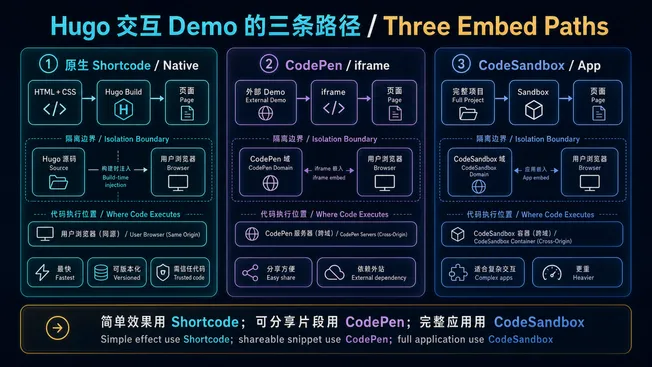
Hugo shortcodes make it easy to embed live code demos. Here are three ways:
The diagram first separates their boundaries: a native shortcode, a CodePen iframe, and a CodeSandbox app serve different complexity levels and execute code in different places.
1. Inline CSS Demo (No External Service)
A spinning loader animation, right in the article:
A gradient text animation:
2. Embed CodePen
If you already have CodePen creations, embed them with a single shortcode:
text1 lines of code
{{< codepen id="yourPenID" height="400" tab="result" >}}3. Embed CodeSandbox
For React / Vue components, use CodeSandbox:
text1 lines of code
{{< codesandbox id="yourSandboxID" height="450" view="preview" >}}These three shortcodes cover most code demo scenarios — no extra tools needed.